Doc Vault - File Manager Doc Vault - File Manager

Doc Vault - File Manager

Your files and privacy off the cloud.

Powerful file management at your fingertips

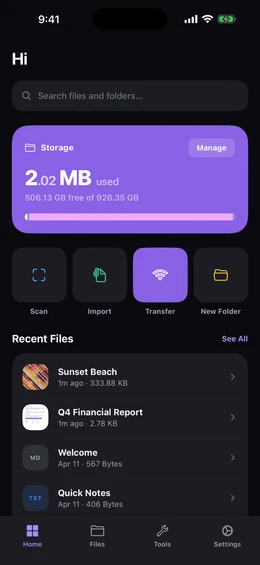
Doc Vault home screen showing a storage usage donut chart, recent files, and folder shortcuts

Your Private Space

Everything stays on your device. No cloud, no accounts, no tracking. See your storage and recent files at a glance the moment you open the app.

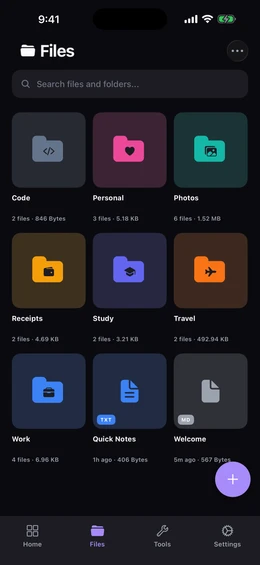
Files screen showing nine color-coded folders in a grid with custom icons and file counts

Browse and Organize

Nested folders with custom colors and icons. Switch between grid and list views, sort and filter, and select multiple files for bulk actions.

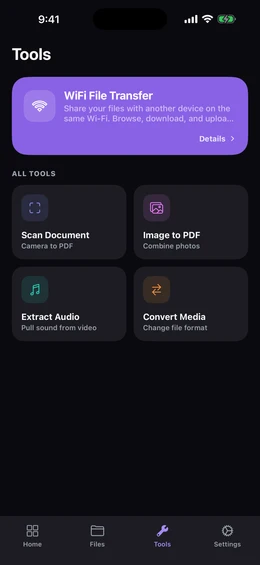
Tools screen listing document scanner, Wi-Fi transfer, image to PDF, extract audio, and media converter

Built-In Tools

Document scanner, Wi-Fi transfer, image to PDF, extract audio from video, and convert between formats like HEIC to JPG. All in one place.
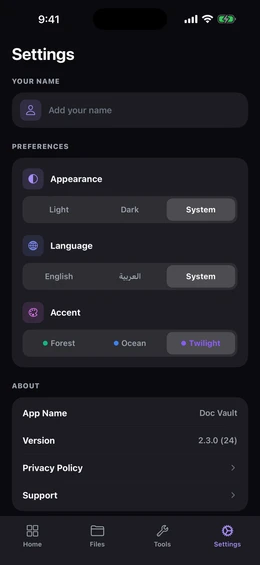
Settings screen showing theme selection with Twilight, Ocean, and Forest color swatches and appearance toggle

Make It Yours

Three color themes (Twilight, Ocean, and Forest) paired with light or dark mode. The whole app reshapes around the look you pick.
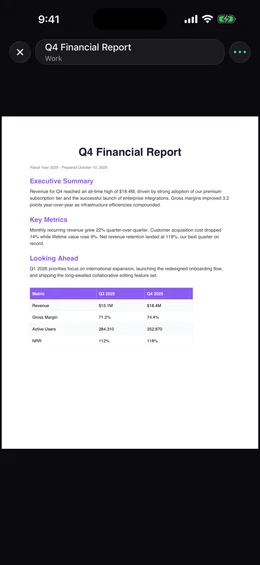
Built-in PDF viewer displaying a multi-page document with toolbar controls

Open Any File

Read PDFs, browse photos, play videos and music, and view 30+ code and text formats with built-in viewers. Background audio and Picture-in-Picture included.

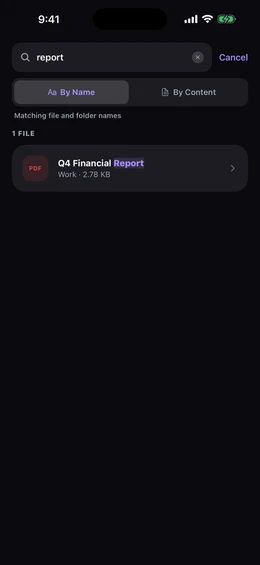
Search screen with results highlighting matches inside PDF and image file contents

Smart Search

Search filenames or the actual content inside your files. Reads text in PDFs and photos, and indexes EXIF metadata. All on your device, never uploaded.

What's New

2.2.0 April 11, 2026
  • Wi-Fi Transfer: send and receive files from any device on your network, secured with a PIN code
  • Document Scanner: scan pages with your camera and save as images or PDF
  • Image to PDF: pick images, drag to reorder, and create a PDF in one tap
  • Extract Audio: save the audio from any video as a separate file
  • Convert Media: convert between formats like HEIC to JPG, MOV to MP4, and more
  • Search inside your files: text in photos and PDFs is automatically recognized
  • Find photos by camera, location, artist, or other EXIF details
  • Crop, rotate, and flip images with the option to save as a copy or replace the original
  • Trim videos and audio without losing quality
  • Edit text, code, and Markdown files with a built-in editor and formatted preview
  • Background audio playback with lock screen controls
  • Fullscreen video and Picture in Picture
  • Zip and unzip files and folders directly in the app
  • iPad support with landscape layouts
  • Full Arabic support with a dedicated Arabic font
Earlier versions
2.1.2 March 25, 2026
  • Fixed PDF files not opening in some cases
  • Fixed chart colors overlapping in certain themes
  • Visual improvements in light mode
2.1.1 March 16, 2026
  • Share files from any app directly into Doc Vault
  • File type filter to find images, videos, documents, and more
  • Swipe gestures and back button for folder navigation
  • Select files, folders, and links together for bulk actions
  • Storage donut chart on the home screen
  • Smarter recent files based on your activity
  • Redesigned app icon
  • Bug fixes and performance improvements
2.1.0 March 8, 2026
  • Built-in viewers for images, videos, audio, and text files
  • Customize folders with colors and icons
  • Full-screen search across all your documents
  • File details available from the context menu
  • Refreshed UI with improved Arabic translations
2.0.1 February 8, 2026
  • Privacy policy and support pages
  • Bug fixes and stability improvements
2.0.0 January 9, 2026
  • Support for all file types, not just PDFs
  • Folder browser with breadcrumb navigation
  • New app icon and cleaner file names
1.7.0 December 28, 2025
  • Multi-select: long-press to select multiple files and folders
  • Move and delete multiple items at once
  • Rename files and folders directly from the list
  • Improved search experience
  • Folder path shown at the top for easy navigation
1.6.5 December 25, 2025
  • Vibration feedback on buttons and menus
  • Improved Arabic layout support
  • Bug fixes
1.6.0 December 25, 2025
  • Full Arabic and English language support
  • Automatic layout direction for Arabic
  • New action menu, dropdown menu, and quick-add button
  • Language preference saved across sessions
1.5.0 December 20, 2025
  • Save web links and open them in-app
  • Three color schemes: Twilight, Ocean, and Forest
  • Light and dark mode with system option
  • Redesigned home screen with storage stats
  • New settings screen with theme preview
1.0.0 December 19, 2025
  • Import and view PDF documents
  • Organize files into folders
  • Grid and list view modes
  • Search across document names
  • Light and dark theme support