

Doc Vault - File Manager Doc Vault - File Manager

Doc Vault File Manager

Your files and privacy off the cloud.

New in 2.4.0

Powerful file management at your fingertips

Doc Vault home screen with a greeting, a search field, a storage card, quick actions for Scan, Import, Transfer and New Folder, and recent files with previews Doc Vault lock screen with the vault illustration and an Unlock button Files screen with a grid of color-coded folders with custom icons, each showing its item count and size The built-in viewer showing a travel itinerary PDF with a mountain photo, day-by-day plan and trip facts Search by content for "warranty", with three results and every match highlighted inside the text Tools screen with Scan Document, Images to PDF, Convert Media, Compress Video, Extract Audio and Wi-Fi File Transfer The music player with album art, playback progress, controls, shuffle and repeat Storage screen with space used, a breakdown by type, and suggestions for large videos, duplicates and similar photos
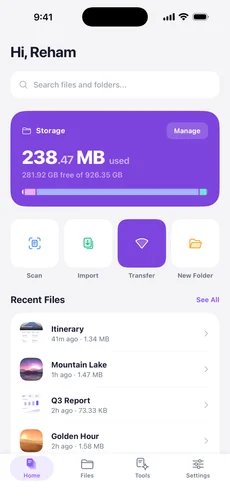
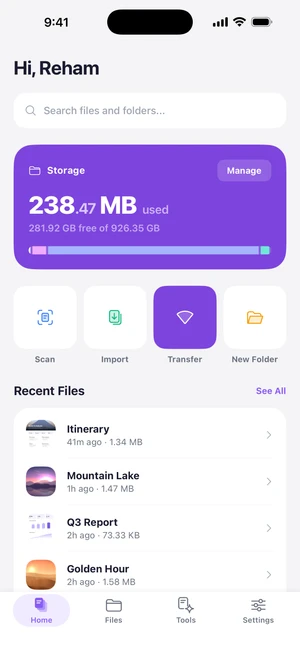
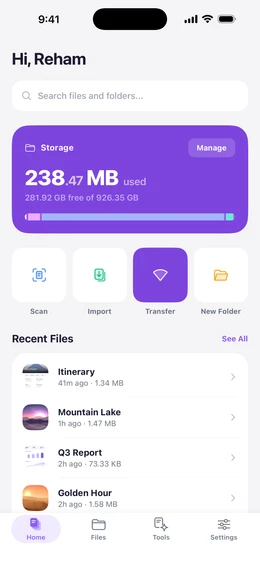
  1. Doc Vault home screen with a greeting, a search field, a storage card, quick actions for Scan, Import, Transfer and New Folder, and recent files with previews

    Your Private Space

    Everything stays on your device: no account, no cloud, no tracking. Home opens with search, your storage at a glance, quick actions and the files you opened last.

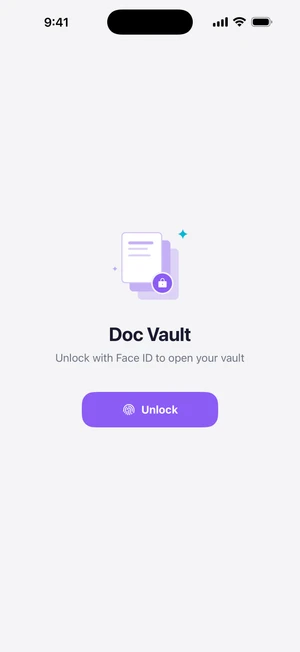
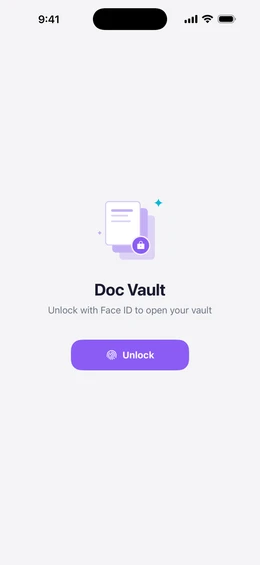
  2. Doc Vault lock screen with the vault illustration and an Unlock button

    Locked to You

    Turn on App Lock and Doc Vault opens only with your face, fingerprint or device passcode. While it's locked, your files stay hidden when you switch apps.

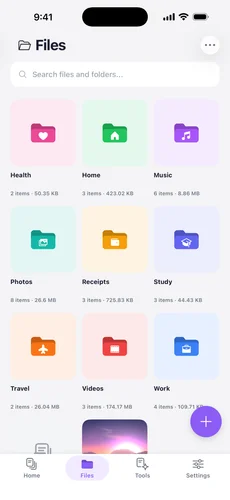
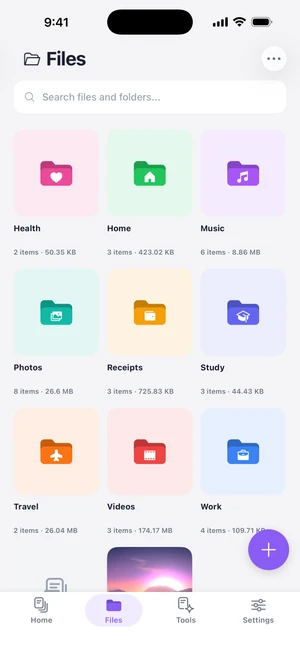
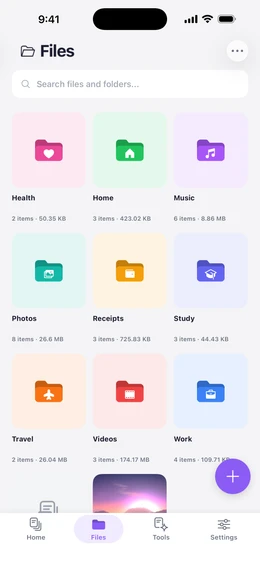
  3. Files screen with a grid of color-coded folders with custom icons, each showing its item count and size

    Organized Your Way

    Folders inside folders, each with its own color and icon. Photos, videos and PDFs show a preview, and you can move, copy, zip or share many files at once.

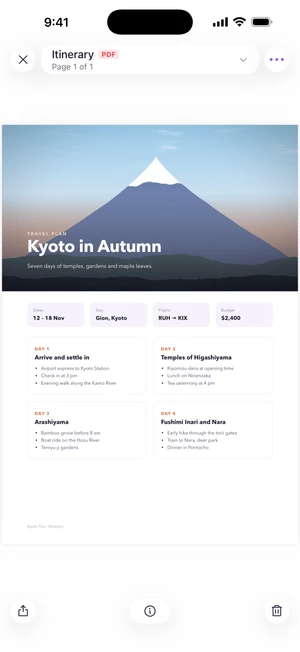
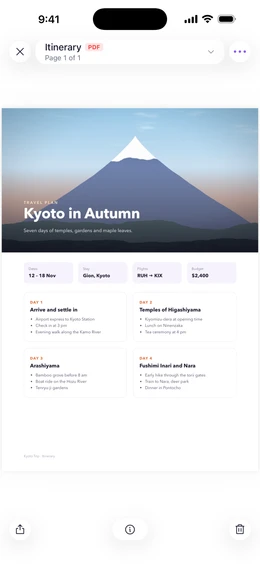
  4. The built-in viewer showing a travel itinerary PDF with a mountain photo, day-by-day plan and trip facts

    Opens Everything

    PDFs, photos, videos, music and more than 30 text and code formats open in one viewer. Crop and straighten photos and trim videos without leaving the app.

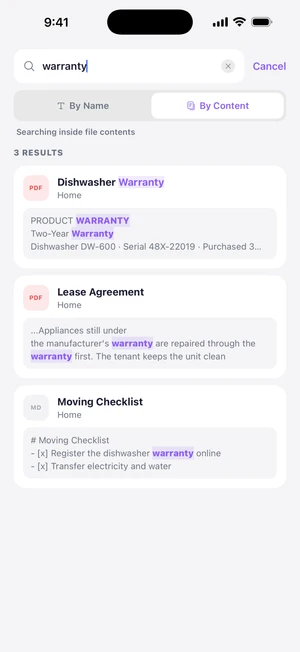
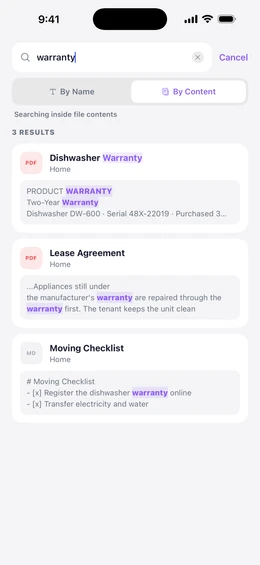
  5. Search by content for "warranty", with three results and every match highlighted inside the text

    Search Inside Files

    Search by name or by the words inside your files, with every match highlighted. Doc Vault reads the text in PDFs, notes and photos on your device, so nothing is uploaded.

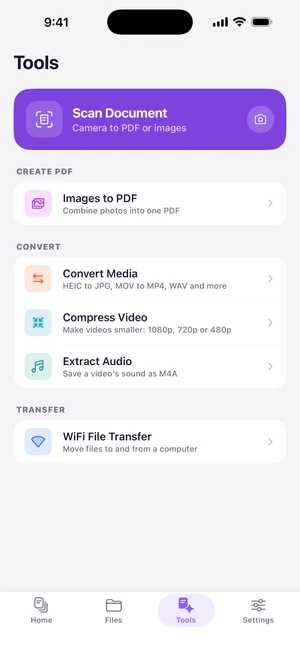
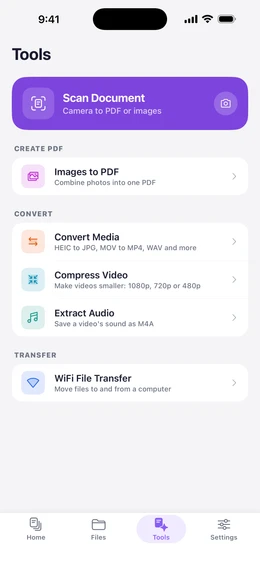
  6. Tools screen with Scan Document, Images to PDF, Convert Media, Compress Video, Extract Audio and Wi-Fi File Transfer

    Built-In Tools

    Scan documents, turn photos into a PDF, extract audio, convert and compress media, and move files to your computer over Wi-Fi with no cable and no app.

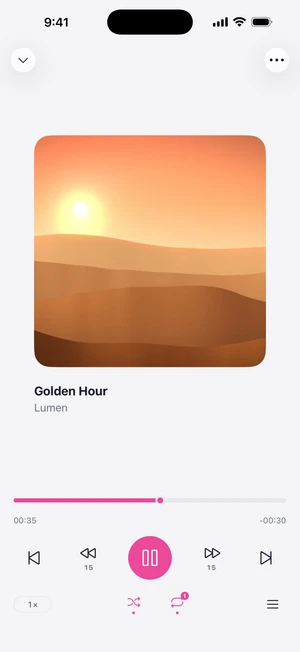
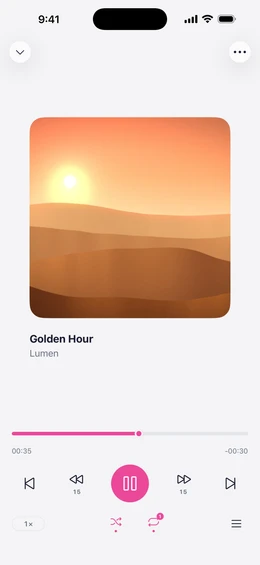
  7. The music player with album art, playback progress, controls, shuffle and repeat

    Music and Video, in One Player

    Play your music and videos with a queue, shuffle and repeat, and keep listening from the lock screen or while you browse.

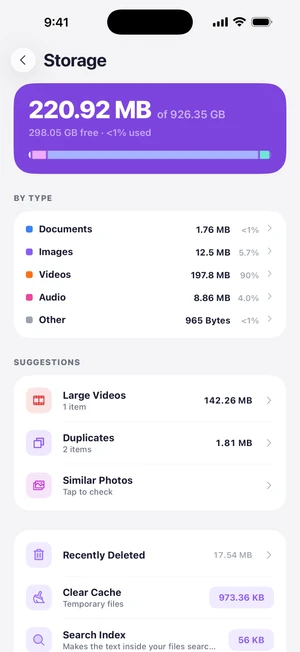
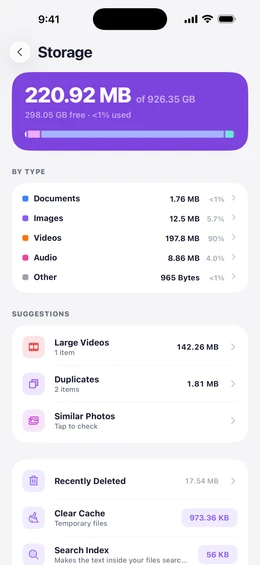
  8. Storage screen with space used, a breakdown by type, and suggestions for large videos, duplicates and similar photos

    Free Up Space, Safely

    See what takes up space, find large files and duplicates, and compress videos. Deleted files wait 30 days in Recently Deleted.

A quick tour

Real screens from the app.

What's New

2.4.0 October 1, 2026
  • Lock Doc Vault with your face, fingerprint, or device passcode
  • Deleted files wait 30 days in Recently Deleted, and you can bring them back
  • A new music and video player with a queue, shuffle, repeat, and lock screen controls
  • One viewer for every file: swipe to close, page through photos, and search inside PDFs on iPhone and iPad
  • A new photo editor with crop, straighten, rotate, and flip, and a new video and audio trimmer
Show all 10 changes
  • Find large files, duplicates, and similar photos, and compress videos to free up space
  • Redesigned Tools and Wi-Fi Transfer, and a new app icon
  • Share files into Doc Vault from any app, then move them to a folder in one step
  • Faster launch and smoother scrolling, even with thousands of files
  • Better Arabic throughout, and many fixes
Earlier versions
2.3.0 July 23, 2026
  • Images, videos, and PDFs now preview their contents in every list and grid
  • Export files and folders straight to your device or another app
  • Preview Word, Excel, PowerPoint, and iWork documents in the app on iPhone and iPad
  • Redesigned home screen with search, storage at a glance, and quick actions
  • Browse all your files by type: documents, images, videos, audio
  • New Storage screen showing what takes up space, and a one-tap cleanup to free some up
  • Files screen now shows folder sizes and sorts by date added or last opened
  • A mini player keeps audio and video going while you browse
  • Faster PDF reader with pinch to zoom, text selection, and a slider to move between pages
  • Import several files at once, and paste files copied from other apps
  • Search from the home screen, with matches highlighted and recent searches saved
  • Long-press menus and filters now follow your chosen theme
  • More folder colors and icons, picked on a roomier customization screen
  • Set your name to personalize the home greeting
  • Wider format support including AVIF, ICO, 3GP, and more code files
  • Fixes for files with special characters in their names, plus many other improvements
2.2.0 April 11, 2026
  • Wi-Fi Transfer: send and receive files from any device on your network, secured with a PIN code
  • Document Scanner: scan pages with your camera and save as images or PDF
  • Image to PDF: pick images, drag to reorder, and create a PDF in one tap
  • Extract Audio: save the audio from any video as a separate file
  • Convert Media: convert between formats like HEIC to JPG, MOV to MP4, and more
  • Search inside your files: text in photos and PDFs is automatically recognized
  • Find photos by camera, location, artist, or other EXIF details
  • Crop, rotate, and flip images with the option to save as a copy or replace the original
  • Trim videos and audio without losing quality
  • Edit text, code, and Markdown files with a built-in editor and formatted preview
  • Background audio playback with lock screen controls
  • Fullscreen video and Picture in Picture
  • Zip and unzip files and folders directly in the app
  • iPad support with landscape layouts
  • Full Arabic support with a dedicated Arabic font
2.1.2 March 25, 2026
  • Fixed PDF files not opening in some cases
  • Fixed chart colors overlapping in certain themes
  • Visual improvements in light mode
2.1.1 March 16, 2026
  • Share files from any app directly into Doc Vault
  • File type filter to find images, videos, documents, and more
  • Swipe gestures and back button for folder navigation
  • Select files, folders, and links together for bulk actions
  • Storage donut chart on the home screen
  • Smarter recent files based on your activity
  • Redesigned app icon
  • Bug fixes and performance improvements
2.1.0 March 8, 2026
  • Built-in viewers for images, videos, audio, and text files
  • Customize folders with colors and icons
  • Full-screen search across all your documents
  • File details available from the context menu
  • Refreshed UI with improved Arabic translations
2.0.1 February 8, 2026
  • Privacy policy and support pages
  • Bug fixes and stability improvements
2.0.0 January 9, 2026
  • Support for all file types, not just PDFs
  • Folder browser with breadcrumb navigation
  • New app icon and cleaner file names
1.7.0 December 28, 2025
  • Multi-select: long-press to select multiple files and folders
  • Move and delete multiple items at once
  • Rename files and folders directly from the list
  • Improved search experience
  • Folder path shown at the top for easy navigation
1.6.5 December 25, 2025
  • Vibration feedback on buttons and menus
  • Improved Arabic layout support
  • Bug fixes
1.6.0 December 25, 2025
  • Full Arabic and English language support
  • Automatic layout direction for Arabic
  • New action menu, dropdown menu, and quick-add button
  • Language preference saved across sessions
1.5.0 December 20, 2025
  • Save web links and open them in-app
  • Three color schemes: Twilight, Ocean, and Forest
  • Light and dark mode with system option
  • Redesigned home screen with storage stats
  • New settings screen with theme preview
1.0.0 December 19, 2025
  • Import and view PDF documents
  • Organize files into folders
  • Grid and list view modes
  • Search across document names
  • Light and dark theme support